
Part of the Guides by Eli Media
What is SEO? All the basics at a glance.
SEO stands for Search Engine Optimization.
It covers all measures to make a website more visible in search results. That applies to Google, Bing and others as well as ChatGPT, Perplexity, and so on.
On this page we want to give you helpful tips so you can set up the basics for your website.
The goal of SEO
The goal is for your pages to become more visible in search engines and attract more relevant visitors. In short: SEO brings you organic traffic without ads.
The 3 most important SEO areas
SEO covers three areas:
- On-page (the content of your website),
- Technical SEO (speed / structure) and
- Off-page (backlinks from other sites).
The absolute essentials
- Satisfy the search intent of your target customer.
- Place the keyword in the URL, the title, and the first and last paragraph of the page.
- Create valuable and interesting content.
Learning path: What you should know in order
- What “organic traffic” is and how it differs from ads.
- How search engines work: crawling, indexing, ranking.
- Understand search intent and know SERP types.
- Choose keywords and topic clusters.
- On-page basics: title, meta description, H1, structure, internal links.
- Technical SEO: robots.txt, sitemap, canonical, mobile, performance.
- Content quality: helpful, trustworthy content (E-E-A-T).
- Off-page signals: backlinks and mentions.
- Measurement: Google Search Console, KPIs, tracking.
- Internal linking and information architecture.
- Special cases: local SEO, images/video.
- Continuous optimization and monitoring of updates.
1. What is organic traffic compared to ads?
Ads = Advertisements = usually paid advertising on e.g. Google or Facebook.
Organic traffic = users who land on your site without ads, e.g. via Google or ChatGPT search or links from other websites.
2. How search engines work
Search engines go through three steps:
- Crawling
- Indexing
- Serving the results.
Only pages that are reachable and understandable can rank.
Tip: Sitemaps help discovery; clean URL structures and internal links make indexing easier. These can be created automatically, for example with WordPress plugins such as Yoast. (In-Depth Guide to How Google Search Works)
3. Search intent and SERPs
People search with different search intents or goals:
Informational search
The searcher simply wants information or answers to a question. It is about learning or curiosity.
- Examples: “How do you change a tire?”, “What is SEO?”, “Ideas for a summer holiday”.
- Matching content: blog posts, articles, guides or tutorials – anything that explains and helps.
Navigational search
The searcher wants to go directly to a specific website or page, e.g. a brand or a login.
- Examples: “RankMath” (a tool), “Facebook”, “YouTube login”.
- Matching content: home pages or landing pages that match the brand or site – like the front door to a house.
Commercial search
The searcher looks at products or services to decide whether to buy. It is like pre-purchase shopping research.
- Examples: “Best WordPress SEO tools”, “Best restaurants in Rome”, “Reviews of product XY”.
- Matching content: product comparisons, reviews or detailed offer information – so people can weigh options.
Transactional search
The searcher is ready to act, e.g. buy, sign up or download. It is about completing the action.
- Examples: “Buy RankMath”, “iPhone 17 Pro Max price”, “Download Semrush trial”.
- Matching content: product pages, checkout areas or pages with clear calls to action like “Buy now” – anything that makes the next step easy.
Match content and format (text, list, FAQ, video, etc.) to that intent.
Check the current Google results for your keyword. They show which result format Google expects and what users actually care about.
4. Keywords and topic clusters
Start with clear main topics and break them into longer keywords. That way you cover search intents specifically and build authority in a topic area.
Collect semantically related subtopics. Each page should serve one clear primary keyword and 2–4 secondary terms.
5. On-page basics: levers that work quickly
- Title (title tag): 50–60 characters, keyword first, clear value proposition.
- Meta description: 120–155 characters, with a call to action.
- H1 and subheadings: structure logically, improve readability.
- Structure & formatting: short paragraphs, lists, images with alt text.
- Internal links: guide users and strengthen topical relevance.
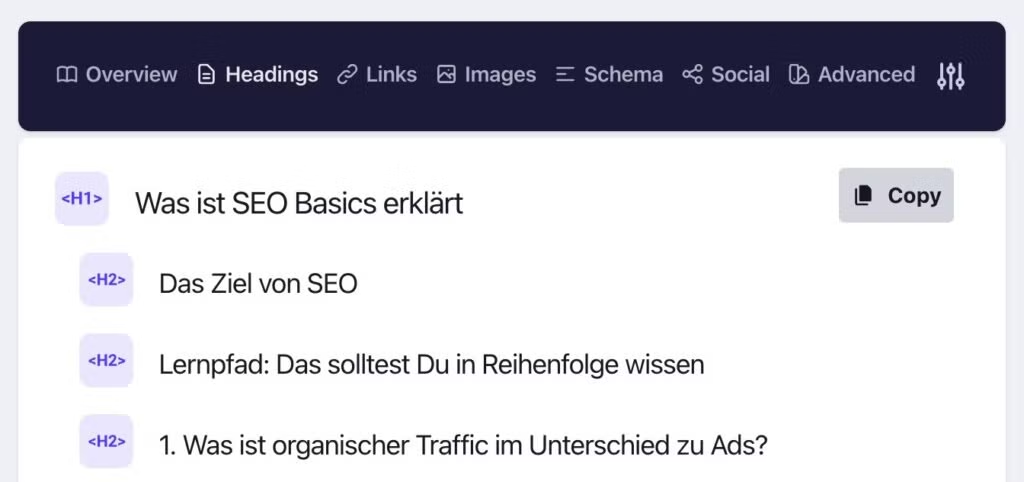
Tip: The Chrome extension “Detailed” is very helpful for quick checks.
6. Technical SEO: the foundation for visibility
- Crawlability and indexability: robots.txt, 200 status, no unnecessary noindex.
- Sitemap & canonicals: define unique original URLs.
- Performance & mobile: fast, stable, mobile-friendly pages.
- HTTPS & clean redirects: trust and consistency.
Meet the Search Essentials: technical minimum requirements, spam policies and best practices. Without them Google cannot reliably serve your page (Google Search Essentials).
7. Content quality: “people-first” and E-E-A-T
Create content that truly solves the problem, shows experience and builds trust. Avoid text produced only for search engines.
Google describes public, “notable” ranking systems and emphasizes that helpful content is now part of the core systems
E-E-A-T is an abbreviation for Google’s four quality criteria:
- Experience,
- Expertise,
- Authoritativeness and
- Trustworthiness.
In other words: if your website content shines with experience and expertise and you can “prove” that e.g. through a verified business (for example on Google Business) as well as numerous backlinks, you are already in a very strong position!
8. Off-page: signals from outside
Backlinks from topically relevant, trustworthy sites are strong quality signals. Focus on link-worthy content, digital PR and partnerships – not artificial spam sites.
Brand mentions, reviews and consistency of your NAP data (Name, Address, Phone number) are especially important locally.
9. Measuring success: what really counts
- Search Console: impressions, clicks, CTR, average position.
- Visibility by topic: how your clusters develop.
- Engagement & conversions: time on page, scroll depth, leads/revenue.
Google Search Console shows you which queries give you impressions, clicks and rankings. You can spot opportunity keywords where you already have visibility but not many clicks yet. You also see technical issues such as indexing errors or mobile usability.
Important SEO KPIs include
- organic traffic,
- click-through rate (CTR),
- average position,
- bounce rate and
- Conversions.
Important: not every page needs a lot of traffic. A page can still be valuable if it brings few visitors but triggers leads, purchases or inquiries.
Tracking is not only “how many people came to the page” but “what did they do”. You should therefore measure events, e.g. click on “Request a quote”, scroll depth, video play, newsletter signup. That way you can optimize content not only for visibility but for measurable impact.
Other analytics tools such as Google Analytics, Matomo, Plausible or PostHog help you generate more detailed, easier-to-read data.
Use the data to refine content, add internal links and plan the next iteration.
10. Internal linking and information architecture
Internal links connect your content meaningfully. They help users find the next relevant topic and help search engines understand relationships between pages. With internal links you can also deliberately concentrate authority on key pages, e.g. a “money page”.
It is important that the anchor text (the clickable text) clearly describes what the target page is about. “Learn more about technical SEO” is better than “Click here”. That way the search engine better understands what the target page is relevant for, and users know clearly where they are going.
Information architecture describes how your content is logically grouped and reachable. A clean setup is e.g. topic → subtopic → article/detail. Deep click paths such as Home > Blog > Category > Subcategory > Post are okay, but content should not be “hidden” at the sixth level. Every important page should ideally be reachable in 2–3 clicks.
11. Special cases: local SEO, images/video.
Local SEO matters for businesses with a physical address or regional catchment area. It includes keeping company name, address and phone number (NAP) consistent everywhere, a well-maintained Google Business Profile, local reviews and local landing pages. Content should show regional relevance, not only generic text.
Images and videos are search traffic sources in their own right. Images need descriptive filenames, alt texts and context in the content. Videos can appear in search results when title, description, chapters and structured data are well maintained. Visual content can earn you rankings even if your text is not right at the top.
12. Continuous optimization and monitoring of updates
SEO is not a “done after launch” topic but a cycle. You publish content, measure performance, improve structure, add answers to new user questions and strengthen internal linking where you see potential. Pages that already have medium visibility can often be pushed clearly forward with a few adjustments.
Search engines keep evolving. There are repeated updates to ranking systems, spam policies, how results are displayed and expectations of “quality”. Therefore you should regularly check whether rankings suddenly rose or fell sharply, whether certain page types are losing and whether new technical warnings appeared.
Long term, monitoring also means content hygiene. Old content must be updated, merged or removed when it cannibalizes itself or is no longer accurate. That keeps your domain thematically clear, avoids thin pages and signals freshness and reliability.
Avoid common mistakes
- Keyword stuffing: unnatural repetition hurts.
- Thin content & duplicates: too little unique value.
- Unclear page structure: If users and crawlers do not understand how content is related, both user experience and ranking suffer. A clear hierarchy and logical internal linking are essential.
- Missing or duplicate metadata: Identical title and description tags on multiple pages lead to poor click-through rates and confusion for search engines (you essentially cannibalize your own content). Every page needs unique, meaningful metadata.
- Ignoring mobile optimization: Pages that work poorly on mobile devices lose a lot of visibility. Responsive design, fast load times and simple navigation are standard.
- No regular updates: Content ages quickly. If you do not maintain texts, data and links, the relevance of your pages declines over time, especially on fast-moving topics.
- Missing measurement and adjustment: Without evaluating data you cannot steer SEO success. Without analyzing Search Console or other tools you optimize blindly and miss opportunities or problems.
7-step plan to get started
- Choose a target page and check search intent.
- Define one primary keyword and 2–4 secondary keywords.
- Optimize title, meta and H1, structure the page and link internally.
- Revise content: add examples, FAQ, images with alt text.
- Technical check: indexing, sitemap, canonical, mobile, load time.
- Publish and interconnect related pages internally.
- Measure with Search Console and iterate every 4–6 weeks.
Frequently asked questions
SEO stands for search engine optimization and describes all measures to make a website more visible in search engines such as Google (without paid ads).
SERP is an abbreviation for “Search Engine Results Page”. Imagine you type a word or question into Google and hit Search. The page that then appears, with all the links and suggestions meant to help you – that is the SERP.
Depending on competition, website condition and content quality, first results can sometimes appear within days, more realistically after a few weeks. In general, though, SEO is usually a process that builds over months.
SEO brings organic traffic by optimizing content and technical setup. SEA (Search Engine Advertising) means paid ads in search engines. Both strategies complement each other well.
Relevant content, a clean technical structure, internal linking, backlinks from trustworthy sites and user satisfaction are among the key factors.
It depends on the scope: from your own time investment via tools to agency services. Good SEO work costs money, but pays off long term through stable traffic if visitors are converted into paying customers.
At Eli Media we currently start from €1,000 / month.
Yes and no. Every website benefits from SEO (even small projects), since even minimal optimizations such as better titles, load times and internal links can have a big effect. But as with everything, time and money spent on SEO should always be weighed realistically against potential revenue. If additional visitors cannot sooner or later be turned into more profit than the SEO spend, the investment is naturally questionable.
For example with tools such as Google Search Console, Google Analytics, Plausible, PostHog, Matomo, Semrush, Ahrefs, Sistrix and so on. Important metrics are clicks, impressions, ranking positions and conversions.